
Cancellation
In case you don't require a mailbox anymore, we will be sad to see you go, but make the process easy for you.
You can cancel any time towards your next subscription term.
In case you don't require a mailbox anymore, we will be sad to see you go, but make the process easy for you.
You can cancel at any time towards your next subscription term. Our subscriptions are on a fixed monthly or yearly term by term basis. If you cancel you won't be charged for the following term anymore.
Simply sign into your account on our website and cancel your subscription.
[WEBSITE}
To cancel please log into your account.
Go to Subscriptions and cancel the subscription.
Done.
Do note that we are not be able to process cancellations via email or chat.
In case you come from one of the legacy systems or former platforms please use the form below.
[CANCELLATION FORM]
CANCELLATION ACTIONS
After you cancel please make sure to redirect all your mails. We have a certain leanway (about 1 month) on mails still arriving. But please note shall we receive official mailings from authorities, IRAS, ACRA, Banks etc we will have to impose charges for address usage and/or return the mails to sender with a notification of unauthorized use.
IMPORTANT: In line with more stringent ACRA registration requirements, you can cancel an address used as official ACRA business address only once you changed the registration address or the company has been struck off from the registry.
Parcels, Couriers etc.
We are mainly a mail service provider. We allow some parcels and small deliveries. Restrictions apply.
PARCELS & PACKAGES
Myposte is predominantly a digital PO box for letter and document scanning and forwarding, we are not a fulfillment service or freight forwarder.
We do accept occasional parcels for our clients though (Restrictions apply)
+ The parcel size guideline is up to shoebox size and up to 2kg max.
+ Larger or heavier parcels may be rejected or impose a fee as listed in the pricing table.
+ Parcel receiving is free of charge on all standard plans. For our Private+ plan, there is a parcel receiving fee.
+ Parcels to be stored at our facility or to be forwarded by us may have to be inspected for safety and authority reasons.
+ Parcel notification follow our regular processing times and might be later than the actual confirmation from the sender.
+ Missed deliveries or redeliveries are to be done by the user.
+ We will always try to receive and securely store your items, but is not liable for not properly received or delivered items.
COURIERS & DELIVERIES
Being mainly a mail service provider, we are also happy to accept courier deliveries. Couriers and deliveries are generally able to reach us during our core business hours.
IMPORTANT: We cannot control or be responsible for the couriers / mailmans' schedules, timings, and effort to deliver. Some deliveries or registered items might not be able to be handed out to our staff.
In case of missed deliveries, we will scan the note and redelivery or pick-up or authorization instructions to you.

Mails Storage/Retention
Your plan includes a storage allowance for mail items and parcels. See your subscribed product for details.
STORAGE
Your plan includes a storage allowance for mail items and parcels. Please note that we will shred an dispose any items above that timing due to space constraints and to enable a comfortable uncluttered mail system for all users.
See your subscribed product for details.
General Storage allowance
START+ 30 days
PRO+ 60 days
MAX+ 90 days
After the expiry, we generally move the mail to a trash location first before finally recycling the mail items. If you can’t make it for a collection in time you can always request Mailbot actions or let us know.
How to Update Your Credit Card or Payment Method – Myposte
If you have a new credit card or want to change your credit card details, please log-in and change the payment method under the SUBSCRIPTION tab in your account.
Need to update your credit card or received a payment-declined notification?
You can easily update the credit card or payment method associated with your Myposte subscription through your customer account.
This is particularly important if your card has expired, been replaced, or a recent subscription payment was unsuccessful.
IMPORTANT: You must update the payment method linked to your specific Myposte subscription. Changing your card details in your general account payment settings may not update the card used for recurring subscription payments.
How to Update Your Payment Method
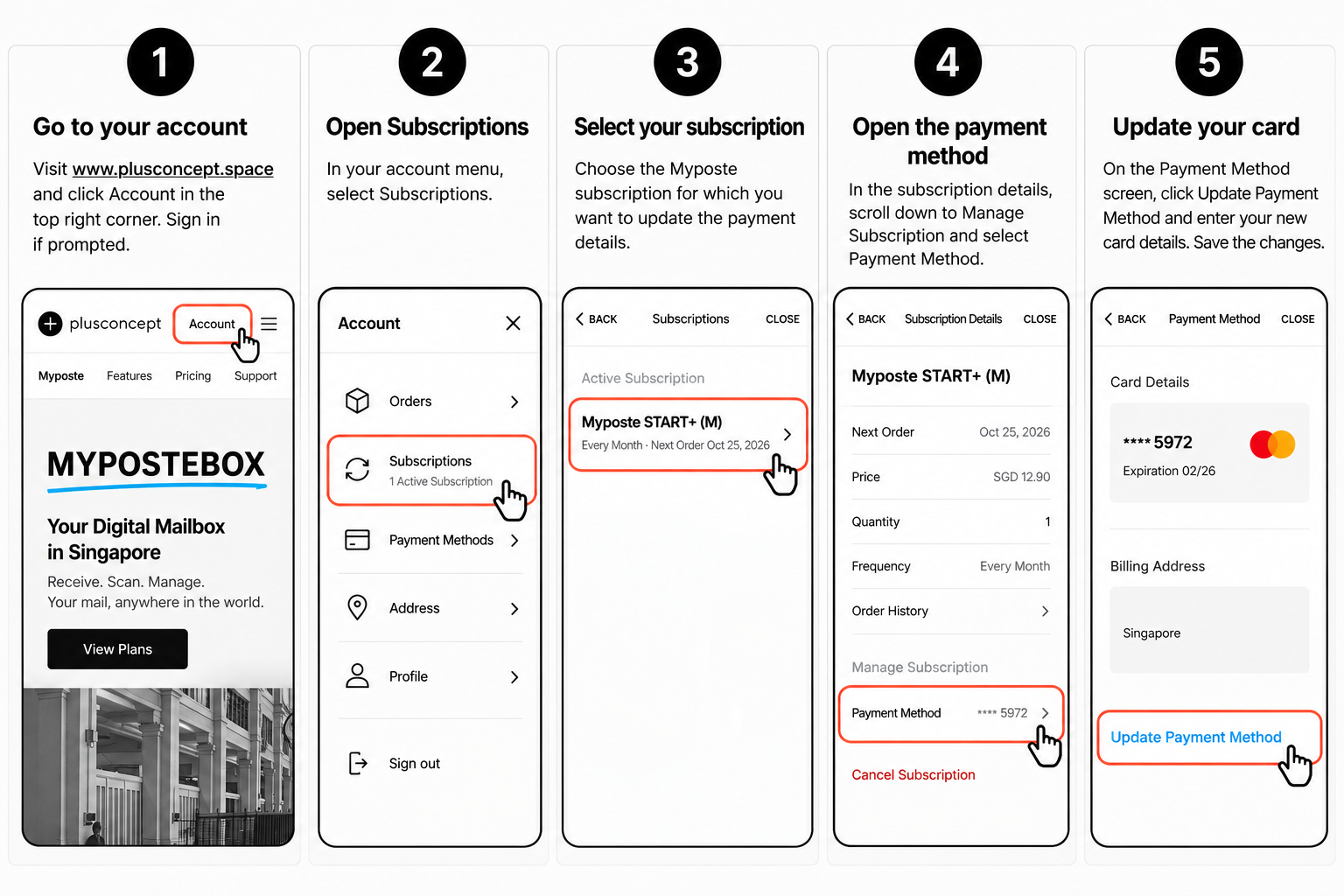
Follow these five simple steps to update your payment information.
Step 1 — Log in to your customer account
Visit www.plusconcept.space and click Account in the top-right corner.
Sign in using the email address associated with your Myposte subscription.
Step 2 — Open your subscriptions
Once logged in, open your customer account menu and select Subscriptions.
You will see an overview of your active and previous subscriptions.
Step 3 — Select your Myposte subscription
Under Active Subscriptions, find and select the Myposte subscription for which you want to update your payment details.
If you have multiple subscriptions, make sure you select the correct one.
Step 4 — Open the subscription’s payment method
On the Subscription Details screen, scroll down to Manage Subscription.
Select Payment Method to view the credit card currently associated with this subscription.
Step 5 — Update your credit card
On the Payment Method screen, click Update Payment Method.
Enter your new credit card information and save your changes.
Your updated card will now be associated with your Myposte subscription.
⚠️ Important: Make Sure You Update the Correct Payment Method
Your Squarespace customer account may have two different payment method settings:
1. General Account Payment Method
Found under Account → Payment Methods.
Changing your card here does not necessarily update the payment method used for your existing subscriptions.
2. Subscription Payment Method
Found under Account → Subscriptions → Your Myposte Subscription → Payment Method.
✅ This is the payment method you must update to ensure your recurring Myposte subscription charges use the correct card.
What Happens If Your Subscription Payment Was Declined?
If your Myposte subscription payment was unsuccessful, Squarespace will automatically attempt to collect the payment again.
The usual payment retry schedule is:
Day 0: Initial payment attempt fails. You receive an email notification.
Day 5: Squarespace automatically retries the payment.
Day 10: Squarespace makes another payment attempt. If unsuccessful, your subscription may be automatically cancelled.
Please update your payment details as soon as possible to avoid interruption to your Myposte service.
Updating your credit card does not necessarily trigger an immediate payment. The system will attempt to process the outstanding payment according to its scheduled retry process.
If your card information is already correct, please check that your bank allows the transaction and that sufficient funds are available.
Having Trouble Updating Your Payment Details?
If you experience any difficulties, we’re here to help.
Contact Myposte Customer Support if:
You cannot log in to your customer account.
You cannot find your Myposte subscription.
You are unable to update your credit card.
Your payment continues to be declined despite updating your information.
Simply contact our support team, and we’ll assist you.
For your security, please never send your full credit card details by email.
Keep Your Myposte Subscription Running Smoothly
Keeping your payment details up to date helps ensure uninterrupted access to your digital mailbox, mail scanning, forwarding and other Myposte services.
Thank you for choosing Myposte by PlusConcept.
The Myposte Team
PlusConcept Singapore
Need to update your credit card or received a payment-declined notification?
You can easily update the credit card or payment method associated with your Myposte subscription through your customer account.
This is important if your card has expired, been replaced, or a recent subscription payment was unsuccessful.
Important: Make sure you update the payment method linked to your specific Myposte subscription. Changing your card details in the general account payment settings may not update the card used for recurring subscription payments.
Email Address UPDATE
If you have a new email address or want to change your email details.
How customers change their account email addresses
Customers can change their email address when logged into their account. It’s not possible for Myposte to change the account email address for a customer.
Your customers change their account email address as follows:
Click Sign in to log into their account.
Click Account, then click Profile.
Click their current email address.
In the New field, enter the new email address.
In the Confirm new field, enter the new email address again.
Click Save.
Watch for an email to verify the change to their new email address. Click Verify email in the message to complete the process.
The verification email is valid for 48 hours. If a customer needs more time to verify their email address, they can return to the Email panel and click Resend verification email.
Do you offer secretarial, accounting and other services?
YES, as we are in the market of business support and business development for a long time we know the market well.
Find some great offers for you here.
YES, as we are in the market of business support and business development for a long time we know the market well.
Below are some examples of exceptional services, which are reliable and where you can request some good offers via MYPOSTE (Plusconcept).
ASK FOR MYPOSTE PARNTER OFFERS
Can you register my company in Singapore?
YES, we can definitely help.
We have been supporting incorporations since 2012 and researched and worked with great variety of partners throughout the years.
YES, we can definitely help.
We have been supporting incorporations since 2012 and researched and worked with great variety of partners throughout the years.
That’s why we can confidently make you an enticing offer for incorporation and accounting services.
Our incorporation offers start from S$50 for Singaporeans + PR and S$1750 for foreigners.
Click below to find out more about this cost efficient, transparent and reliable offer.