
Need to update your credit card or received a payment-declined notification?
You can easily update the credit card or payment method associated with your Myposte subscription through your customer account.
This is particularly important if your card has expired, been replaced, or a recent subscription payment was unsuccessful.
IMPORTANT: You must update the payment method linked to your specific Myposte subscription. Changing your card details in your general account payment settings may not update the card used for recurring subscription payments.
How to Update Your Payment Method
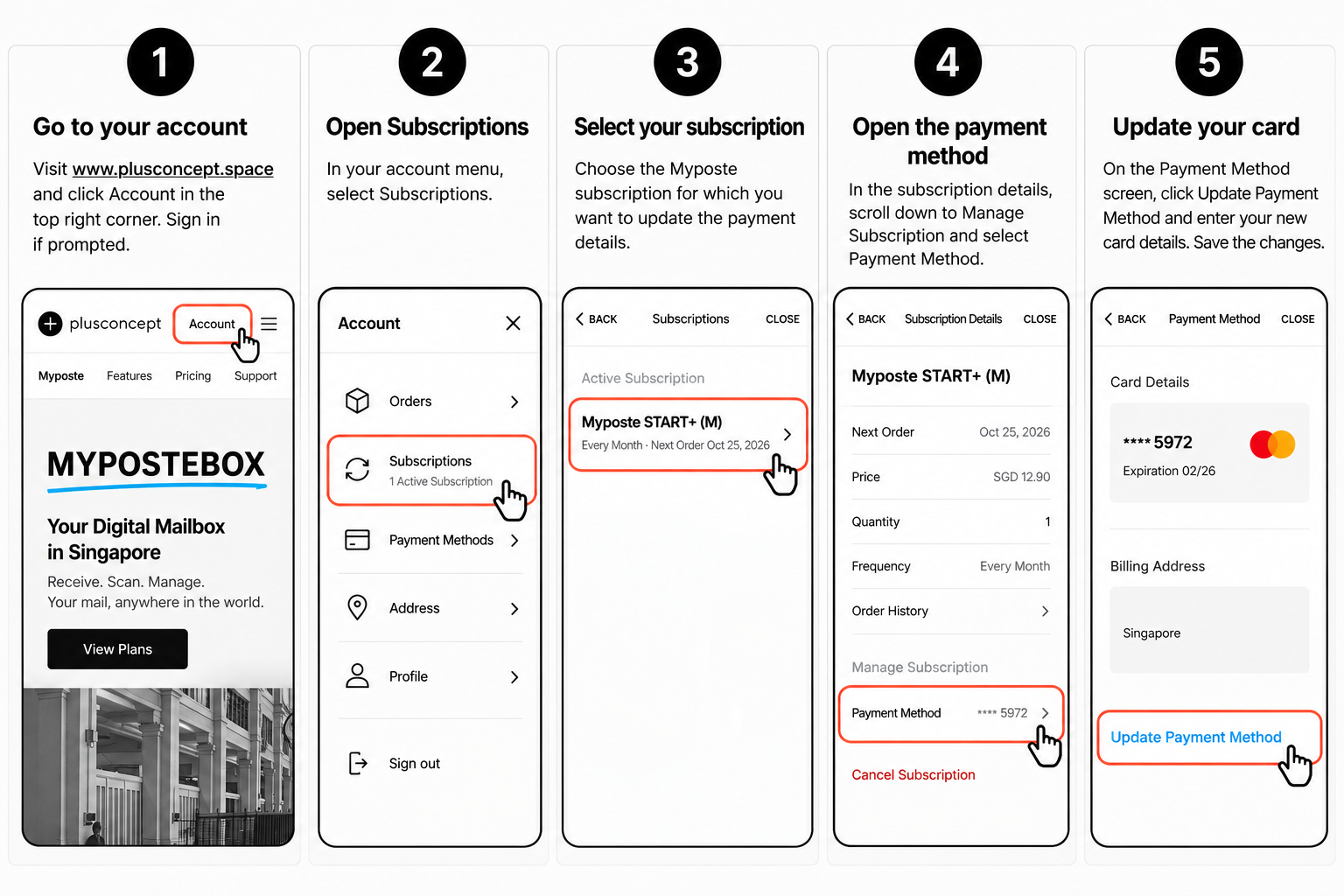
Follow these five simple steps to update your payment information.
Step 1 — Log in to your customer account
Visit www.plusconcept.space and click Account in the top-right corner.
Sign in using the email address associated with your Myposte subscription.
Step 2 — Open your subscriptions
Once logged in, open your customer account menu and select Subscriptions.
You will see an overview of your active and previous subscriptions.
Step 3 — Select your Myposte subscription
Under Active Subscriptions, find and select the Myposte subscription for which you want to update your payment details.
If you have multiple subscriptions, make sure you select the correct one.
Step 4 — Open the subscription’s payment method
On the Subscription Details screen, scroll down to Manage Subscription.
Select Payment Method to view the credit card currently associated with this subscription.
Step 5 — Update your credit card
On the Payment Method screen, click Update Payment Method.
Enter your new credit card information and save your changes.
Your updated card will now be associated with your Myposte subscription.
⚠️ Important: Make Sure You Update the Correct Payment Method
Your Squarespace customer account may have two different payment method settings:
1. General Account Payment Method
Found under Account → Payment Methods.
Changing your card here does not necessarily update the payment method used for your existing subscriptions.
2. Subscription Payment Method
Found under Account → Subscriptions → Your Myposte Subscription → Payment Method.
✅ This is the payment method you must update to ensure your recurring Myposte subscription charges use the correct card.
What Happens If Your Subscription Payment Was Declined?
If your Myposte subscription payment was unsuccessful, Squarespace will automatically attempt to collect the payment again.
The usual payment retry schedule is:
Day 0: Initial payment attempt fails. You receive an email notification.
Day 5: Squarespace automatically retries the payment.
Day 10: Squarespace makes another payment attempt. If unsuccessful, your subscription may be automatically cancelled.
Please update your payment details as soon as possible to avoid interruption to your Myposte service.
Updating your credit card does not necessarily trigger an immediate payment. The system will attempt to process the outstanding payment according to its scheduled retry process.
If your card information is already correct, please check that your bank allows the transaction and that sufficient funds are available.
Having Trouble Updating Your Payment Details?
If you experience any difficulties, we’re here to help.
Contact Myposte Customer Support if:
You cannot log in to your customer account.
You cannot find your Myposte subscription.
You are unable to update your credit card.
Your payment continues to be declined despite updating your information.
Simply contact our support team, and we’ll assist you.
For your security, please never send your full credit card details by email.
Keep Your Myposte Subscription Running Smoothly
Keeping your payment details up to date helps ensure uninterrupted access to your digital mailbox, mail scanning, forwarding and other Myposte services.
Thank you for choosing Myposte by PlusConcept.
The Myposte Team
PlusConcept Singapore
Need to update your credit card or received a payment-declined notification?
You can easily update the credit card or payment method associated with your Myposte subscription through your customer account.
This is important if your card has expired, been replaced, or a recent subscription payment was unsuccessful.
Important: Make sure you update the payment method linked to your specific Myposte subscription. Changing your card details in the general account payment settings may not update the card used for recurring subscription payments.